What the agent does on your site.
Ask for what the site needs: it does it where it has a hand, writes it where it needs your approval, and hands you the steps where it does not. Below, the hands it has today and the specialist work in SEO and GEO it does on its own. And a short list of what it never does.
Writes the words you approve
A page title, a search description, an answer-first opening paragraph, a FAQ block with its schema, a canonical, a robots meta, a redirect. The agent proposes the exact text; you read it; what you approve is published as a revision. Not a word more.
It writes from the page itself and what it knows about the site, and it says plainly when a page is not worth the change.

 Reflexa Agentlumenlabs.io · "Change the pricing page title, redirect /old-offer, fix the missing sitemap and change the colour of the buy button."
Title for /pricing
"Lumen Labs pricing: plans from $49 a month, free trial first"
Redirect /old-offer to /offers
A permanent redirect served by the agent; the old links keep working.
Turn the sitemap on
The check found none. The agent serves one from the published pages and keeps it current.
Change the colour of the buy button
Not in its hands yet. It writes the exact lines and where they go.
Fixes it from inside, one click each
AI crawlers in robots.txt
Allow groups for the retrieval fetchers of OpenAI, Anthropic, Perplexity and Google appended to your robots.txt. Nothing else in the file is touched.
Organization data
Organization JSON-LD in the head of every page: who you are, where, your profiles, in the form engines read.
Sitemap
A sitemap of the published pages, served and kept current by the agent. On WordPress and repository sites.
/llms.txt
A plain-text map of the site built from your own titles, served at /llms.txt for AI fetchers.
Switch off, and the site is exactly as before. Nothing is written into your theme or content.
Reads your pages the way engines do
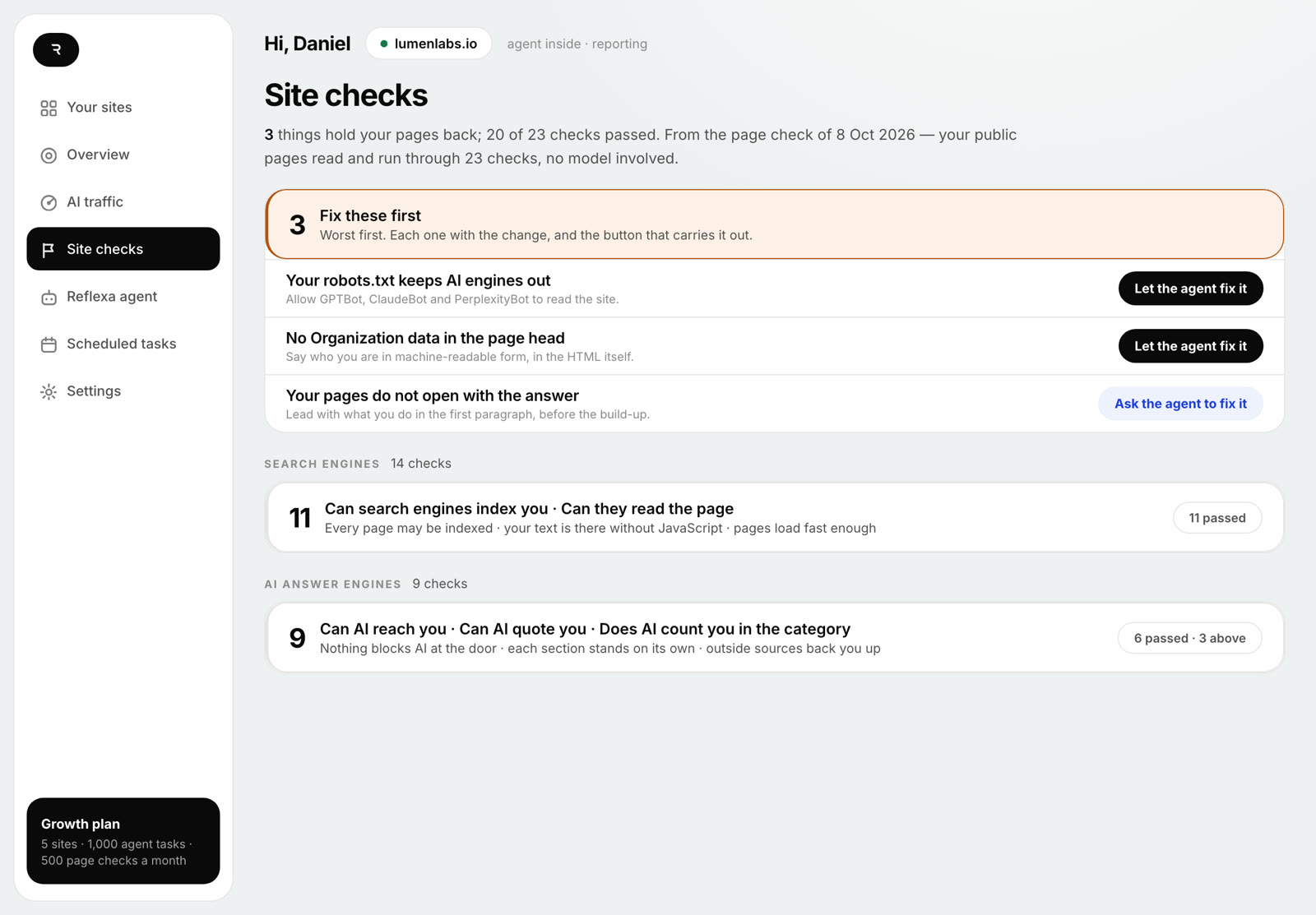
From outside, no model involved: can a crawler reach the page, is the text there without JavaScript, does the page say who you are in a form a machine can read, do others vouch for you. Four groups, in the order an engine meets them.
- Crawler access: robots.txt per AI user agent, CDN and bot filters, login walls, noindex, HTTP status, sitemap, canonical
- Page content: text without JavaScript, response time, internal links, answer-first opening, self-contained sections, headings, dates and authorship
- Brand identity: Organization JSON-LD, the entity graph, sameAs links, schema that matches the visible text, a Wikidata record, consistent external profiles
- External sources: comparison pages in your category, press and reviews
Every AI visit, page by page
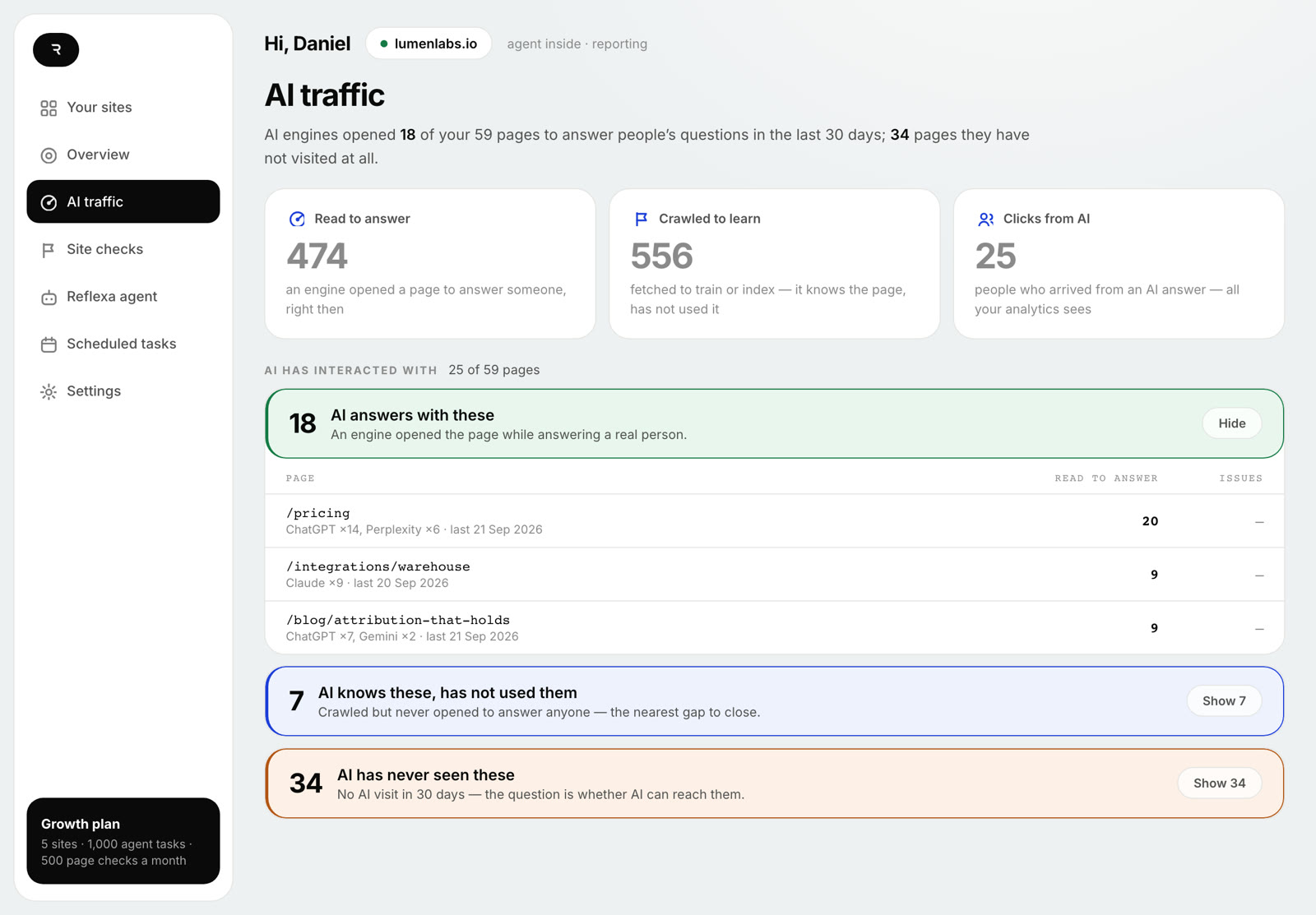
From inside the site, the agent sees every request the fetchers make and sorts them: pages opened to answer a person right now, pages crawled to learn, people who clicked through from an AI answer. Per page, per engine, with the last day for each.
Your analytics tag never fires for these requests, so this is the only place they are counted. Requests are verified against the engines' published IP ranges.
Search Console beside the AI view
Connect Search Console read-only, or upload its CSV. The agent sets Google's clicks, impressions and positions beside what AI did with the same pages, and names the pages Google sends people to that AI has never opened.
Ask in your words
"Find out why the site is not working right now." "Get /prices read by AI." The agent builds the facts for free, runs one model pass for the plan, and marks every item: switch, approve, or yours. A weekly check runs by itself; recurring questions run on a schedule.
Three ways in, one agent
Three steps, no developer
Upload, activate, paste the token. All four switches, all seven fields, redirects, applied as revisions.
One edge fileCloudflare, Vercel, Next.js, Netlify, Node
One file, no dependencies, runs in front of the site. Counts AI visits, serves /llms.txt, robots and Organization data.
GitHub AppA repository the agent commits to
Every approved change is a commit. A static repo takes everything; a built one takes robots, sitemap and llms.txt.
Hosted builders (Shopify, Webflow, Wix, Squarespace, Framer): the check runs from outside and the agent writes the text for you to paste. Nothing installs there.
Limits that are code
- Other plugins or themes, theme files, PHP.
- Users, passwords, roles, the site URL, DNS, hosting, caching.
- Flipping noindex or "discourage search engines": it proposes, you flip.
- Checkout, cart, account and legal pages, and any page you locked.
- Publishing, deleting or repricing content or product data.
- Emailing your customers or posting to your social accounts.
- Spending money without a priced request you started; looping; retrying a paid step on its own.
Questions people ask
Does the agent fix all 23 checks?
No. Nine of the 23 it can act on itself: four as switches, five as text it writes for your approval. Eleven need a person (a Wikidata record, press, consistent profiles elsewhere) and three are informational. The plan marks each item honestly.
What happens on a site where the agent cannot run?
On Shopify, Webflow, Wix, Squarespace and Framer the check still runs from outside and the agent writes the exact text and snippets, robots lines, Organization JSON-LD, the opening, the FAQ, for you to paste. Counting AI visits and the one-click switches need the plugin, an edge file or a connected repository.
Is the AI traffic count verified?
Each request is classified by its user agent and referrer and checked against the IP ranges the engines publish. Requests that fail the check are shown as unverified, not counted as AI. The code calls these counts observed, not guaranteed.
Can I undo a change?
Every switch turns off again, and the site is as it was. Every text edit is a revision: on WordPress a post revision you can restore, on an edge site the rewrite is dropped, on a repository a new commit. The agent re-reads the live page and confirms the change is gone.

Start with the free check. Then tell the agent what you need.
The free check runs the 23 checks on your public pages. Nothing is installed, nothing changes until you press it.
Free check from outside in minutes · the report by email · nothing installed yet